
TABLE OF CONTENTS
- Introducing Antibody search page
- Search page presentation
- Browsing results after a CDR search
- Details & miscellaneous
Introducing Antibody search page
A new Antibody Search page is now available in Orbit BioSequence OBS, providing a simplified way to search multiple sequences of an antibody in a single workflow. Antibody searches are typically based on variable heavy (VH) and variable light (VL) chains, as well as complementarity-determining regions (CDRs 1 to 6).
This dedicated search uses all sequences provided and automatically applies the appropriate search parameters. You can also adjust the search parameters to suit your analysis requirements, for example when working with variable chains.
Search page presentation
A new tab is now present when you open OBS search page. Please locate at the top the related tab Antibody search
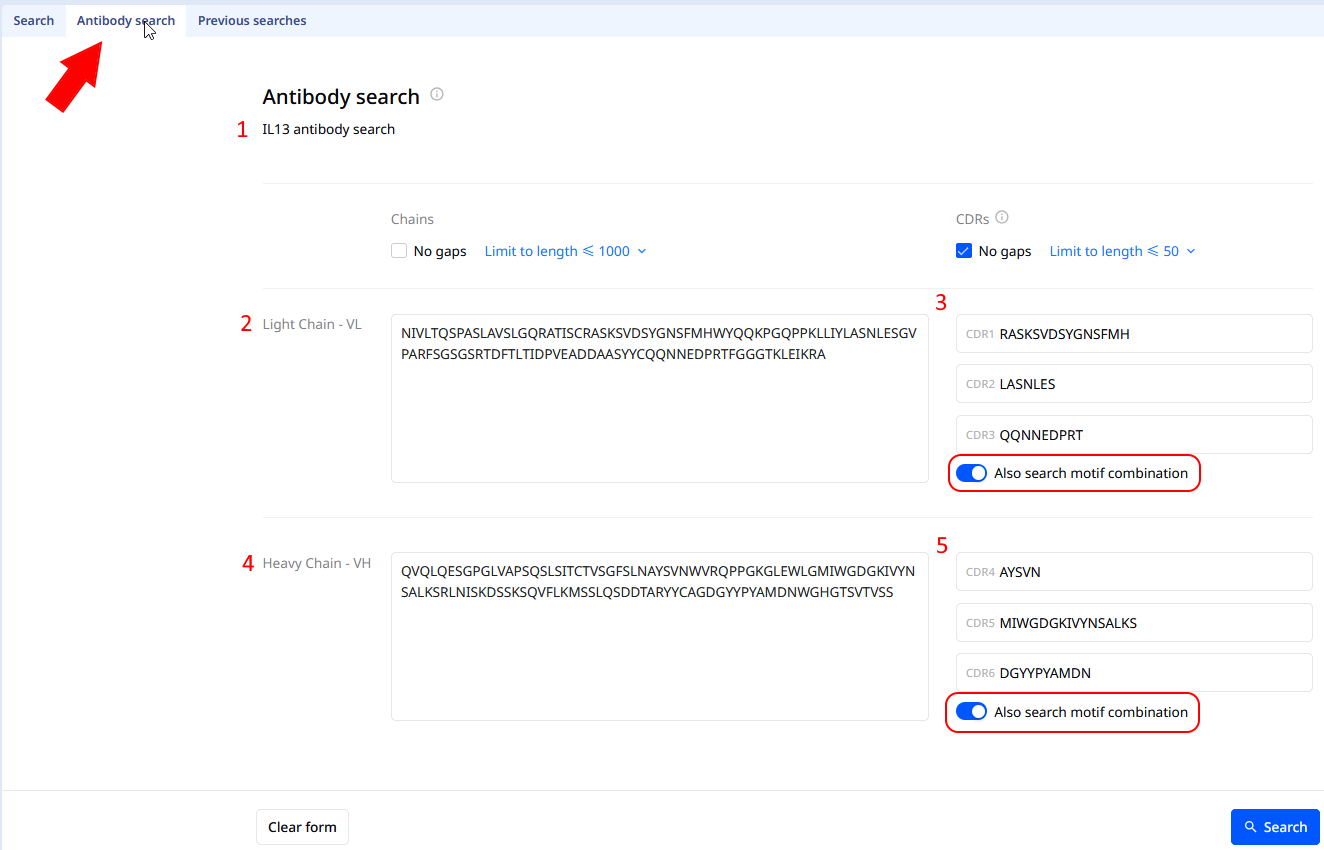
By default, the No gaps for CDR option is activated, contrary to the option Search motif combination. For the sake of illustration, search and results here will use the option Search motif combination.
You can limit the maximum size of sequences to be found:
- CDR : less than 20,50, 1000, 2000, 5000 or to the length of longest CDR
- Chains : less than 1000, 2000, 5000, or to the length of longest chain, or twice the length of longest chain
To start your search, please give a name to your search (mark 1 on screenshot above). The only constraint on sequences is to have one (any sequence, VL, VH, CDR)
For example, you can input only your Light chain VL (mark 2), or you can also add one or more CDR (mark 3). Other inputs (mark 4 & 5) are not mandatory.
Once all the searches are over, a final run is done to combine (OR operator) all the different results. By clicking on results number from the OBS search history, you will display the precise hitlist - Your Orbit search history will show the final step.
About the search motif combination
If the 3 CDR of one group are filled in the motif search with .* in between CDR1 and 2, as well as CDR2 and 3 is done. For instance :
- CDR1: GYTFTNY
- CDR2: NPSSGY
- CDR3: SGGDNYGNPYYFDR
Motif search done will be CDR123 such as
GYTFTNY.*NPSSGY.*SGGDNYGNPYYFDR
Query type into OBS Previous searches and editing a previous search
From the Previous searches tab, you can now identify which type of search has been done beforehand, such as :
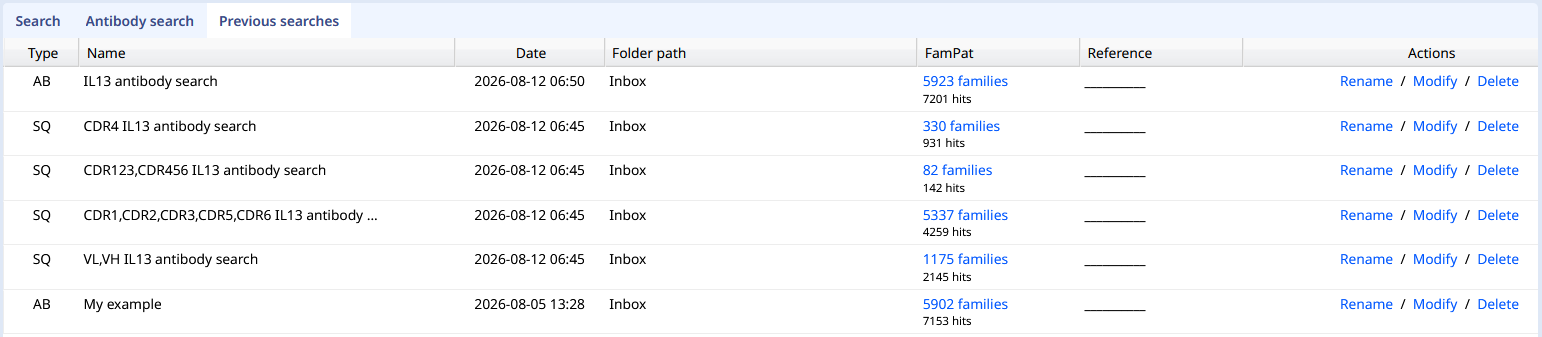
To view the results, please click on the number in FamPat column (here 5923 families). This action will display the Hitlist page and also create a new search statement into your regular search history.
SQ are regular sequence searches. AB refers to Antibody search type. As you can see above, one AB search creates several SQ searches, allowing you to see the results of each intermediate search.
At the top right, actions buttons are still present to Rename, Modify and Cancel/Delete. You can modify an existing search, however Orbit will run a new search after your modifications (previous version will remain), and create new search step in the history.
Browsing results after an Antibody search
Regular hitlist is displayed after an Antibody search, with Alignment tab.
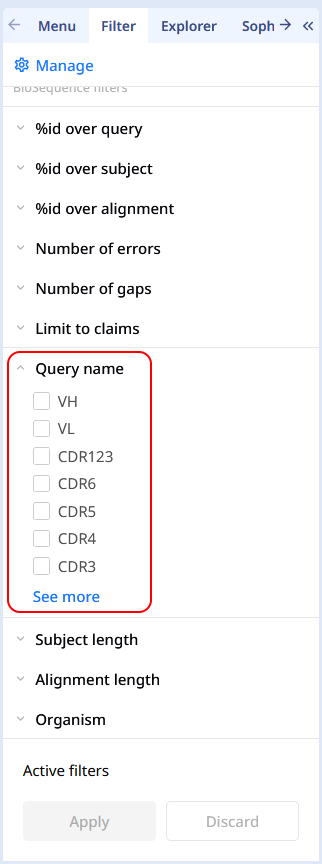
We would like to draw your attention onto our filters in the left-hand pane, and in particular with the Query Name filter option. You can quick narrowing down results on some CDR .
Details & miscellaneous
Currently, only 4 sequence searches can run simultaneously. For instance, if your CDR search includes VL VH and 6 CDR, please wait until all the searches are complete. Depending on the number and lengths of the CDRs and the chains, you may have up to 8 different searches.
Include CDR search into regular search (former way)
Was this article helpful?
That’s Great!
Thank you for your feedback
Sorry! We couldn't be helpful
Thank you for your feedback
Feedback sent
We appreciate your effort and will try to fix the article